
Chatda
Find files by name and by what's inside.
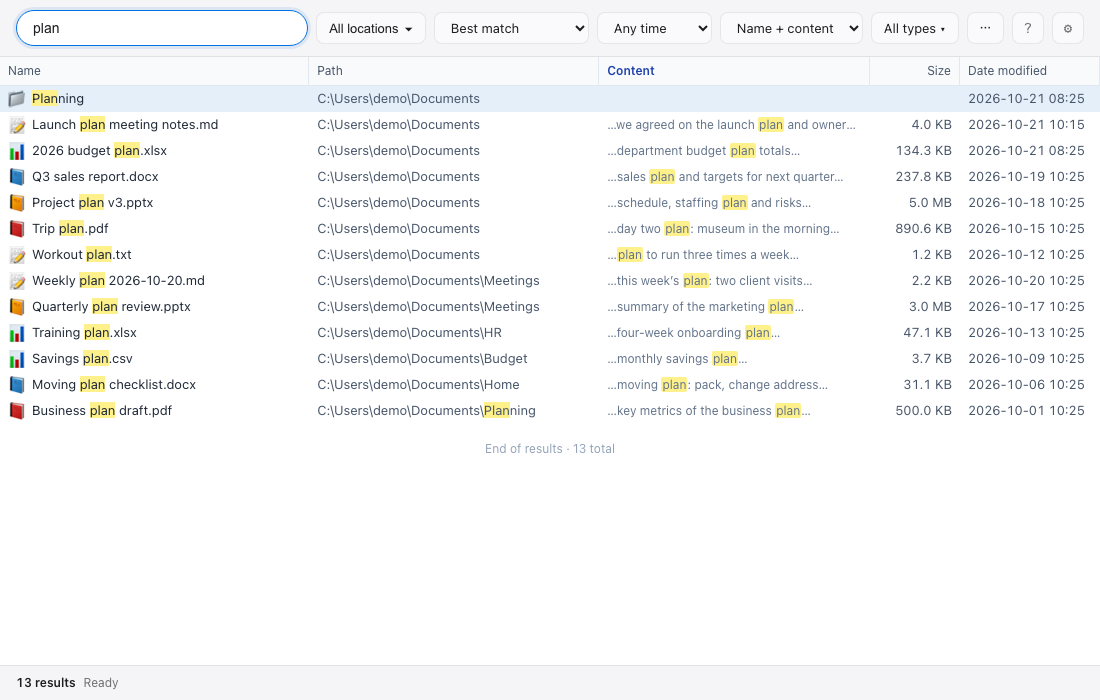
- Finds files by name and by the text inside documents
- Reads the contents of TXT, MD, CSV, DOCX, XLSX, PPTX, PDF and HWPX files
- Indexes every fixed drive on Windows automatically
- Searches network folders (NAS) too
- Results in one table you can sort, filter and group
- Image previews, plus video and PDF thumbnails on Windows
- Rename, copy, drag out or send to the trash right from the results
- Opens from anywhere with Ctrl+Shift+Space
- Updates itself when a new version is out
- Windows and macOS, in English and Korean
- and more...
How fast it is
| Item | Another file search program | Chatda |
|---|---|---|
| First indexing | 47–48 s | 16–17 s |
| One-letter search | 115–128 ms | 87–92 ms |
| Other searches (7 kinds) | 118–201 ms | 34–54 ms |
| Memory after indexing | 910 MB | 765 MB |
| Peak memory | 1,597 MB | 1,083 MB |
| Index file | 381 MB | 125–132 MB |
| Ready to search after reopening | 2.9 s | 1.6–1.7 s |
Download Chatda 9.31.0
What's new · License · SHA-256 · Help